Antlion / Components / Auto Section
Auto SectionSECTION-001
Works out the risers for you. Give it the tread depths and the minimum C-value you want to hold, and it raises each step by the smallest Riser Step increment that still clears that C-value - the shallowest bowl that meets the target. The front row starts on the base line - the start line as the axes facet it - so wire the same field, focal point and Base Line that Section takes. Bake tread_lines if you want to fine-tune the steps by hand in Section afterwards.
1Plan & setup
2Section
32D layout
43D solids
5Analysis
Fig. 1 — PortsReads left, writes right
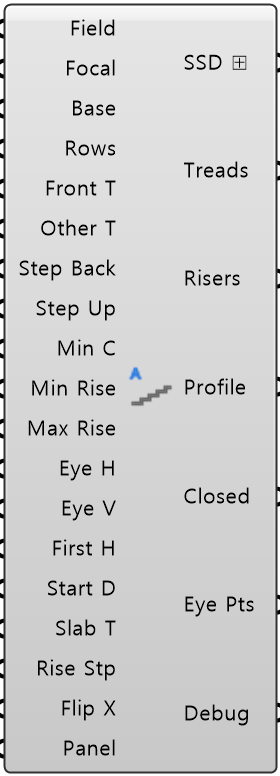
Field Info FieldObject · itemThe field, straight from Field
Focal Point FocalPoint · itemAim the sightlines somewhere else
Base Line BaseCurve · itemThe faceted line the stand is built on
Rows Per Tier RowsInteger · listHow many steps each tier has, front row included
Front Treads Front TNumber · listDepth of the front step
Other Treads Other TNumber · listDepth of every step above the front one
Tier Step Back Step BackNumber · listHow far the tier behind starts back from the outer end of the last tread below, on its top surface
Tier Step Up Step UpNumber · listHow high the tier behind starts above the outer end of the last tread below, on its top surface
Minimum C-Values Min CNumber · listThe C-value every row must hold
Minimum Riser Min RiseNumber · itemShallowest riser to build
Maximum Riser Max RiseNumber · itemTallest riser to build
Eye Horizontal Offset Eye HNumber · itemHow far back from the nosing a seated spectator's eye sits
Eye Vertical Offset Eye VNumber · itemEye height above the tread, seated spectator
First Tread Height First HNumber · itemHeight of the first step above field level
Start Distance Start DNumber · itemHow far the first step sits in front of the focal point
Slab Thickness Slab TNumber · itemThickness of the stand slab
Riser Step Rise StpNumber · itemRisers round up to a whole multiple of this, so they set out on site
Flip X Boolean · itemFold the section onto the other side of its own line in plan
Panel Values PanelObject · itemEvery value from Input Panel, as one bundle
Stand Sections SSD ⊞Object · listOne section object per tier
Tread Lines TreadsCurve · treeOne branch per tier
Riser Heights RisersNumber · treeOne branch per tier
Section Profiles ProfileCurve · listThe stepped line along the tread tops, one per tier
Closed Profiles ClosedCurve · listThe closed profile per tier
Eye Points Eye PtsPoint · listEye point of every row, all tiers
Debug Text · itemDeveloper diagnostic output for tracking down bugs
Colored ports carry the chain from one component to the next. The rest are values you set once. Outputs marked ⊞ can go into Table Out, which writes them to a spreadsheet.
Inputs
- Field Info
FieldThe field, straight from Field. Supplies the focal point - Focal Point
FocalAim the sightlines somewhere else. Wired here it wins over Field Info - Base Line
BaseThe faceted line the stand is built on. Its outward normal sets which way it faces - Rows Per Tier
RowsHow many steps each tier has, front row included - one per tier. Two is the minimum (no default - you set this) - Front Treads
Front TDepth of the front step - one per tier. This is usually the deep one (no default - you set this) - Other Treads
Other TDepth of every step above the front one - one per tier (no default - you set this) - Tier Step Back
Step BackHow far the tier behind starts back from the outer end of the last tread below, on its top surface - one per gap between tiers. Negative reaches out over it (no default - you set this) - Tier Step Up
Step UpHow high the tier behind starts above the outer end of the last tread below, on its top surface - one per gap between tiers (no default - you set this) - Minimum C-Values
Min CThe C-value every row must hold - one per tier, or one for all (default 90 mm) - Minimum Riser
Min RiseShallowest riser to build. Front rows needing less get raised to it (default 150 mm) - Maximum Riser
Max RiseTallest riser to build. Rows needing more get capped and warned. 0 = no cap (default 540 mm) - Eye Horizontal Offset
Eye HHow far back from the nosing a seated spectator's eye sits (default 150 mm) - Eye Vertical Offset
Eye VEye height above the tread, seated spectator (default 1200 mm) - First Tread Height
First HHeight of the first step above field level. Unwired = sit it on the base line - Start Distance
Start DHow far the first step sits in front of the focal point. Used only when Base Line is unwired - Slab Thickness
Slab TThickness of the stand slab. Set it once here - everything downstream reads it (default 150 mm) - Riser Step
Rise StpRisers round up to a whole multiple of this, so they set out on site (default 10 mm) - Flip X
Flip XFold the section onto the other side of its own line in plan. It lies on the base line facing away from the focal point either way - true just puts it clear of whatever it overlaps (default false) - Panel Values
PanelEvery value from Input Panel, as one bundle. Anything you wire in yourself wins over it
Outputs
- Stand Sections
SSD ⊞One section object per tier - rows, eye points, profiles. Wire into Stand 2D - Tread Lines
TreadsOne branch per tier. Bake these and feed Section to move steps by hand - Riser Heights
RisersOne branch per tier. Always a whole multiple of Riser Step. The last row of a tier has none - Section Profiles
ProfileThe stepped line along the tread tops, one per tier. Open curve, for preview - Closed Profiles
ClosedThe closed profile per tier - what Stand sweeps into a solid - Eye Points
Eye PtsEye point of every row, all tiers - the points the C-value check uses - Debug
DebugDeveloper diagnostic output for tracking down bugs. Copy this when reporting a problem
- Component
- SECTION-001
- Ribbon
- Bowl ▸ Section 2
- Tier
- core
- Ports
- 19 in · 7 out
- Version
- 1.0.11
- Checked
- 2026-10-08