Antlion / Components / Section Plus
Section PlusHANDRAIL-001
Adds the things a bare section does not have: the front barrier or handrail, accessible (wheelchair) rows, and the sightline check over the barrier. Sits between Section and Stand 2D — pure section geometry stays in Section.
1Plan & setup
2Section
32D layout
43D solids
5Analysis
Fig. 1 — PortsReads left, writes right
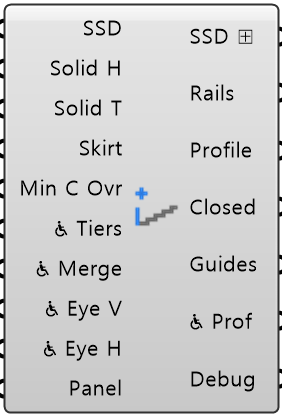
Stand Sections SSDObject · listThe sections to add barriers to, from Section
Solid Heights Solid HNumber · listHeight of the solid barrier above the front tread
Solid Thicknesses Solid TNumber · listThickness of the solid barrier
Solid Skirts SkirtNumber · listHow far the barrier drops below the front tread, hiding the slab edge
Min C Over Rail Min C OvrNumber · itemSmallest C-value over the barrier top
Wheelchair Tiers ♿ TiersBoolean · listPer-tier toggle marking the top row as the accessible (wheelchair) row
Wheelchair Merge ♿ MergeBoolean · itemLevel the top 2 rows of every wheelchair tier
Wheelchair Eye Vertical Offset ♿ Eye VNumber · itemEye height above the platform for a wheelchair user
Wheelchair Eye Horizontal Offset ♿ Eye HNumber · itemHow far back from the nosing a wheelchair user's eye sits
Panel Values PanelObject · itemEvery value from Input Panel, as one bundle
Stand Sections SSD ⊞Object · listThe same sections back, with the barrier and accessible rows written in
Handrail Sections RailsCurve · listThe barrier itself, one closed section curve per tier
Section Profiles ProfileCurve · listTread-top stepped line after the front row was pulled back for the barrier
Closed Profiles ClosedCurve · listThe closed profile rebuilt after the barrier pull-back
Guide Geometry GuidesGeometry · listThe lines behind the barrier check
Wheelchair Section Profiles ♿ ProfCurve · listTread-top line through an accessible platform, one per wheelchair tier
Debug Text · itemDeveloper diagnostic output for tracking down bugs
Colored ports carry the chain from one component to the next. The rest are values you set once. Outputs marked ⊞ can go into Table Out, which writes them to a spreadsheet.
Inputs
- Stand Sections
SSDThe sections to add barriers to, from Section. One branch per tier - Solid Heights
Solid HHeight of the solid barrier above the front tread - one per tier (default 600 mm) - Solid Thicknesses
Solid TThickness of the solid barrier - one per tier (default 150 mm) - Solid Skirts
SkirtHow far the barrier drops below the front tread, hiding the slab edge - one per tier. 0 = none (default 0) - Min C Over Rail
Min C OvrSmallest C-value over the barrier top. Below this the front row cannot see past it. Leave it empty to use the value each tier was designed for (Auto Section Minimum C-Values; 90 mm if the section has none). Barrier only - the wheelchair check always uses the value each tier was designed for, as Section analysis does - Wheelchair Tiers
♿ TiersPer-tier toggle marking the top row as the accessible (wheelchair) row. Empty = all off (default false) - Wheelchair Merge
♿ MergeLevel the top 2 rows of every wheelchair tier. The section does not change - see Wheelchair Section Profiles (default false) - Wheelchair Eye Vertical Offset
♿ Eye VEye height above the platform for a wheelchair user. 1150 mm follows EN 13200-1, measured from the floor - a seated spectator's 1200 mm is measured the same way but includes the seat. Set your own if your code says otherwise Default 1150 mm / 45 in. - Wheelchair Eye Horizontal Offset
♿ Eye HHow far back from the nosing a wheelchair user's eye sits. Leave it at -1 to use the same value as a seated spectator, which is what Section already applied Default -1. - Panel Values
PanelEvery value from Input Panel, as one bundle. Anything you wire in yourself wins over it
Outputs
- Stand Sections
SSD ⊞The same sections back, with the barrier and accessible rows written in - Handrail Sections
RailsThe barrier itself, one closed section curve per tier - Section Profiles
ProfileTread-top stepped line after the front row was pulled back for the barrier - Closed Profiles
ClosedThe closed profile rebuilt after the barrier pull-back. Wire into Stand - Guide Geometry
GuidesThe lines behind the barrier check - top point, sightline and where they meet - Wheelchair Section Profiles
♿ ProfTread-top line through an accessible platform, one per wheelchair tier. The tier's own section is unchanged - Debug
DebugDeveloper diagnostic output for tracking down bugs. Copy this when reporting a problem
- Component
- HANDRAIL-001
- Ribbon
- Bowl ▸ Section 2
- Tier
- core
- Ports
- 10 in · 7 out
- Version
- 1.0.11
- Checked
- 2026-10-08