Antlion / Components / Field
FieldFIELD-001
Draws the playing field outline for a sport and the focal point every sightline is measured to. Start here — the rest of the chain hangs off field_info.
1Plan & setup
2Section
32D layout
43D solids
5Analysis
Fig. 1 — PortsReads left, writes right
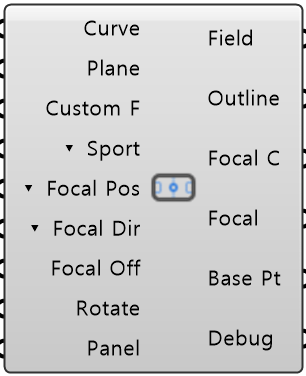
Custom Curve CurveGeometry · itemYour own field outline
Base Plane PlanePlane · itemWhere the field sits and which way it faces
Custom Focal Point Custom FPoint · itemYour own focal point
Sport Mode ▾ SportText · itemWhich sport sets the field size and shape (default SOCCER)
Focal Position Mode ▾ Focal PosText · itemWhere the focal point sits: HALF_N or HALF_S halfway along a long side, HALF_E or HALF_W at an end, CUSTOM at…
Focal Direction Mode ▾ Focal DirText · itemVERTICAL lifts the focal point above the field, HORIZONTAL pulls it inside the outline
Focal Offset Focal OffNumber · itemHow far the focal point sits from the field surface or outline
Rotate 90 RotateBoolean · itemTurn the field a quarter turn so its long side runs the other way
Panel Values PanelObject · itemEvery value from Input Panel, as one bundle
Field Info FieldObject · itemThe field as one object
Field Outline OutlineCurve · itemThe playing field outline in plan
Focal Curve Focal CCurve · itemThe outline moved by Focal Offset
Focal Point FocalPoint · itemThe point every sightline aims at
Base Point Base PtPoint · itemThe same point on the field outline, before Focal Offset was applied
Debug Text · itemDeveloper diagnostic output for tracking down bugs
Colored ports carry the chain from one component to the next. The rest are values you set once. Inputs marked ▾ take a Value List: wire one in and it fills with the choices.
Inputs
- Custom Curve
CurveYour own field outline - a closed planar curve, or a planar surface whose border is used. Once wired, the preset Sport Mode is ignored - Base Plane
PlaneWhere the field sits and which way it faces (default world XY) - Custom Focal Point
Custom FYour own focal point. Used when Focal Position Mode is CUSTOM, and required for a Custom Curve that is not a rectangle - there it also sets which way the field faces (toward the outline center) - Sport Mode
▾ SportWhich sport sets the field size and shape (default SOCCER). CUSTOM uses your Custom Curve - wiring the curve does the same - Focal Position Mode
▾ Focal PosWhere the focal point sits: HALF_N or HALF_S halfway along a long side, HALF_E or HALF_W at an end, CUSTOM at Custom Focal Point (default HALF_S) - Focal Direction Mode
▾ Focal DirVERTICAL lifts the focal point above the field, HORIZONTAL pulls it inside the outline (default VERTICAL) - Focal Offset
Focal OffHow far the focal point sits from the field surface or outline - Focal Direction says which way. Ball on the ground is 0 (default 0). Treated as 0 for a Custom Curve that is not a rectangle - Rotate 90
RotateTurn the field a quarter turn so its long side runs the other way (default false) - Panel Values
PanelEvery value from Input Panel, as one bundle. Anything you wire in yourself wins over it
Outputs
- Field Info
FieldThe field as one object - outline, frame, sport and focal point - Field Outline
OutlineThe playing field outline in plan - Focal Curve
Focal CThe outline moved by Focal Offset - lifted (VERTICAL) or pulled inside (HORIZONTAL) - Focal Point
FocalThe point every sightline aims at - Base Point
Base PtThe same point on the field outline, before Focal Offset was applied - Debug
DebugDeveloper diagnostic output for tracking down bugs. Copy this when reporting a problem
- Component
- FIELD-001
- Ribbon
- Bowl ▸ Section 1
- Tier
- core
- Ports
- 9 in · 6 out
- Version
- 1.0.11
- Checked
- 2026-10-07