Antlion / Components / Table Section
Table SectionSECTION-003
Builds the tier sections from the numbers in your workbook instead of lines you draw. Wire the book from Table In, plus the same field, focal point and Base Line that Section takes. The barrier settings live in the workbook too, so this one component does what Section and Section Plus do together - the outputs are the same.
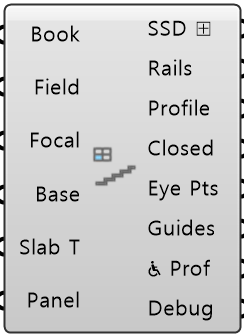
Colored ports carry the chain from one component to the next. The rest are values you set once. Outputs marked ⊞ can go into Table Out, which writes them to a spreadsheet.
Inputs
- Book
BookWire from Table In. Holds the step table, the tier table and the settings - Field Info
FieldThe field, straight from Field. Supplies the focal point - Focal Point
FocalAim the sightlines somewhere else. Wired here it wins over Field Info - Base Line
BaseThe faceted line the stand is built on. Its outward normal sets which way it faces - Slab Thickness
Slab TThickness of the stand slab. Leave at 0 to use the one in the workbook Default 0. - Panel Values
PanelEvery value from Input Panel, as one bundle. Anything you wire in yourself wins over it
Outputs
- Stand Sections
SSD ⊞The tier sections, with the barrier and any accessible rows written in - Handrail Sections
RailsThe barrier itself, one closed section curve per tier - Section Profiles
ProfileTread-top stepped line, after the front row was pulled back for the barrier - Closed Profiles
ClosedThe closed profile the stand is swept from - Eye Points
Eye PtsEye point of every row, all tiers - the points the C-value check uses - Guide Geometry
GuidesThe lines behind the barrier sightline check - Wheelchair Section Profiles
♿ ProfTread-top line through an accessible platform, one per wheelchair tier. The tier's own section is unchanged - Debug
DebugDeveloper diagnostic output for tracking down bugs. Copy this when reporting a problem
What it does
Each tier's start point comes from the workbook's 12_INPUT_TIER page as start_mode, start_h and start_v. PREV_TIER, the default for every tier above the first, measures from the outer end of the lower tier's last tread - the edge away from the field - at that tread's top surface, not from its nosing or a railing top. The upper tier's first tread front edge then sits start_h outward (negative when it overhangs the tier below) and start_v up, so start_v alone sets the height between tiers and the lower tier's last riser height is not used. START_LINE, the default for the first tier (tier_index 0), measures from an anchor point on the Base Line - the start line as the axes facet it - so 0, 0 puts the first tread front edge on the Base Line; FOCAL measures from the focal point. Section Plus then moves the whole section outward by the first tier's solid_thickness, which keeps the tiers where they are relative to each other. To take the values off a drawing: start_v is the top of the upper tier's first tread minus the top of the lower tier's last tread, and start_h is the horizontal distance from the lower tier's last tread outer end to the upper tier's first tread front edge, negative toward the field.
- Component
- SECTION-003
- Ribbon
- Bowl ▸ Section 2
- Tier
- core
- Ports
- 6 in · 8 out
- Version
- 1.0.11
- Checked
- 2026-10-08