Antlion / Components / Excel Workbook
Excel WorkbookIO-007
Creates an .xlsx workbook you can fill in with Excel, with the input pages already laid out, and hands the reference to Table In and Table Out. Give the project folder, optionally a file name (the folder name is used when empty), and press Run - an existing file connects, a missing file is made there, and either way it opens in Excel. No internet or sign-in is needed, so this is the path that works on closed networks. The reference is saved with the Grasshopper file; because it is a file path, moving the workbook or the .gh means picking the file again. The 10-series pages are yours and are written only at creation; the 80-series pages belong to the plugin.
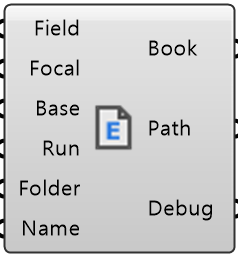
Colored ports carry the chain from one component to the next. The rest are values you set once.
Inputs
- Field Info
FieldOptional. Seeds the focal-to-start-line reference the preview columns need - Focal Point
FocalOptional. Overrides the field's focal point, same as Section - Base Line
BaseThe faceted line the stand is built on. Its outward normal sets which way it faces - Run
RunWire a Boolean Button. Nothing touches the disk on an ordinary solve Default false. - Folder Path
FolderFolder the workbook lives in (e.g. C:\\project). It must exist - it is not created for you. The file name comes from File Name, or from the folder name when File Name is empty - File Name
NameOptional workbook name (e.g. stadium). Empty uses the folder name. The .xlsx is added for you. If that file exists Run connects to it; if not, Run makes it there
Outputs
- Book
BookThe workbook reference. Wire it into Table In and Table Out - Path
PathWhere the workbook file is - open it in Excel to fill in the input pages - Debug
DebugDeveloper diagnostic output for tracking down bugs. Copy this when reporting a problem
- Component
- IO-007
- Ribbon
- Table
- Tier
- core
- Ports
- 6 in · 3 out
- Version
- 1.0.11
- Checked
- 2026-10-05