Antlion / Components / Rail 3D
Rail 3DRAIL-001
Builds the railings and parapets as solids — the front barrier, the rear parapet, the edges left by a cut, and the walls around entrance openings. In a bowl assembled from several stands, a per-tier list shorter than the assembled tier count is read per stand: three values set tiers 1, 2 and 3 of every stand. Give one per assembled tier to set each on its own.
1Plan & setup
2Section
32D layout
43D solids
5Analysis
Fig. 1 — PortsReads left, writes right
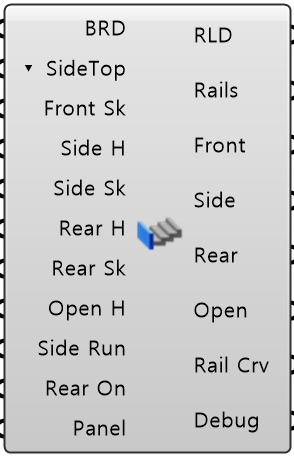
Build Result BRDObject · itemThe 3D bowl from Stand 3D Plus
Side Top Mode ▾ SideTopText · listHow tall the cut-edge parapet is along its run
Front Skirt Depths Front SkNumber · listHow far the front parapet drops below the first tread
Side Heights Side HNumber · listHeight of the parapet along a cut edge, measured above each tread
Side Skirt Depths Side SkNumber · listHow far the cut-edge parapet drops below the tread at each end of its run
Rear Heights Rear HNumber · listHeight of the rear parapet above the last tread
Rear Skirt Depths Rear SkNumber · listHow far the rear parapet drops below the last tread
Opening Rail Heights Open HNumber · listHeight of the parapet around an entrance opening, above the tread
Side Base Runs Side RunNumber · listHow far the underside of the cut-edge parapet runs level from the front before it starts to climb, hiding the…
Rear Enabled Rear OnBoolean · listBuild the rear parapet at the back of each tier
Panel Values PanelObject · itemEvery value from Input Panel, as one bundle
Rail Result RLDObject · itemAll the railings as one object
Railing Breps RailsBrep · treeOne branch per tier
Front Rails FrontBrep · treeOne branch per tier
Side Rails SideBrep · treeOne branch per tier
Rear Rails RearBrep · treeOne branch per tier
Opening Rails OpenBrep · treeOne branch per tier
Rail Curves Rail CrvCurve · treeOne branch per tier
Debug Text · itemDeveloper diagnostic output for tracking down bugs
Colored ports carry the chain from one component to the next. The rest are values you set once. Inputs marked ▾ take a Value List: wire one in and it fills with the choices.
Inputs
- Build Result
BRDThe 3D bowl from Stand 3D Plus. This one wire is the only input needed - Side Top Mode
▾ SideTopHow tall the cut-edge parapet is along its run - one per tier. Hold Side H keeps Side H the whole way, so it meets the rear parapet at a step. Blend to Rear H starts at Side H and eases to Rear H by the back, so the two meet flush (default Hold Side H) - Front Skirt Depths
Front SkHow far the front parapet drops below the first tread - one per tier. Leave it at -1 to use the barrier depth from Section Plus. 0 = no skirt Default -1. - Side Heights
Side HHeight of the parapet along a cut edge, measured above each tread - one per tier. 0 leaves the side railings out (default 1200 mm) - Side Skirt Depths
Side SkHow far the cut-edge parapet drops below the tread at each end of its run - in between it hangs lower still, covering the cut face and the structure below - one per tier. Leave it at -1 to use the barrier depth from Section Plus. 0 = no skirt Default -1. - Rear Heights
Rear HHeight of the rear parapet above the last tread - one per tier. 0 leaves it out, the same as switching it off (default 1200 mm) - Rear Skirt Depths
Rear SkHow far the rear parapet drops below the last tread - one per tier. Leave it at -1 to use the barrier depth from Section Plus. 0 = no skirt Default -1. - Opening Rail Heights
Open HHeight of the parapet around an entrance opening, above the tread - one per tier. Leave it at -1 to follow the front parapet height from Section Plus (no front parapet in the section = no opening parapet either). Give a height to use that instead - it still meets the front parapet at its height where the two join. 0 leaves it out Default -1. - Side Base Runs
Side RunHow far the underside of the cut-edge parapet runs level from the front before it starts to climb, hiding the structure below - one per tier. -1 = the depth of the first row, 0 = climbs right away Default -1. - Rear Enabled
Rear OnBuild the rear parapet at the back of each tier (default true) - Panel Values
PanelEvery value from Input Panel, as one bundle. Anything you wire in yourself wins over it
Outputs
- Rail Result
RLDAll the railings as one object - solids, their kinds and tiers - Railing Breps
RailsOne branch per tier. Every railing as a solid, all kinds together - Front Rails
FrontOne branch per tier. The front parapet at the leading edge of each tier - Side Rails
SideOne branch per tier. The parapet along each cut edge, rising with the treads - Rear Rails
RearOne branch per tier. The parapet at the back of each tier - Opening Rails
OpenOne branch per tier. The parapet around each entrance opening, climbing along its sides and level across the back - Rail Curves
Rail CrvOne branch per tier. The lines each railing was built along - Debug
DebugDeveloper diagnostic output for tracking down bugs. Copy this when reporting a problem
- Component
- RAIL-001
- Ribbon
- Bowl ▸ Section 4
- Tier
- core
- Ports
- 11 in · 8 out
- Version
- 1.0.11
- Checked
- 2026-10-07