Antlion / Components / Table Out
Table OutIO-006
Writes analysis results into the workbook's result pages. Wire the workbook reference and the result objects - section, analysis, seat map or C-value map - and press run. Each result type knows which page it belongs on. The plugin owns those pages and rewrites them whenever the results change - the same results are not sent twice to the same workbook unless you right-click and choose Send again. Copy rows into the input pages if you want to keep and edit them.
1Plan & setup
2Section
32D layout
43D solids
5Analysis
Fig. 1 — PortsReads left, writes right
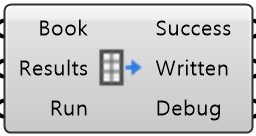
Book Object · itemWire from Google Workbook or Excel Workbook
Results Object · listWire outputs marked ⊞, in any combination
Run Boolean · itemWire a Boolean Button and press it to write
Success Boolean · itemTrue when the last write finished, or was skipped because nothing changed
Written Text · listWhat landed where
Debug Text · itemDeveloper diagnostic output for tracking down bugs
Colored ports carry the chain from one component to the next. The rest are values you set once.
Inputs
- Book
BookWire from Google Workbook or Excel Workbook - Results
ResultsWire outputs marked ⊞, in any combination. Anything with no table form is skipped - Run
RunWire a Boolean Button and press it to write. An ordinary solve writes nothing Default false.
Outputs
- Success
SuccessTrue when the last write finished, or was skipped because nothing changed - Written
WrittenWhat landed where - one line per page - Debug
DebugDeveloper diagnostic output for tracking down bugs. Copy this when reporting a problem
- Component
- IO-006
- Ribbon
- Table
- Tier
- core
- Ports
- 3 in · 3 out
- Version
- 1.0.11
- Checked
- 2026-10-05