Antlion / Components / Seat View
Seat ViewVIEWSEAT-001
Looks through a spectator's eyes. Wire the Seat Map SMD and pick a seat by tier, zone and seat number - or type its address like "T1 05 S 25" - press apply, and the perspective viewport jumps to that seat's analysis eye point looking at its own focal point - the same eye and focus the C-value map measures. Turn live on and the yaw and pitch sliders let you look around from the fixed eye point, so you can judge a vomitory rail or a cut-edge railing exactly as the seated spectator would see it.
1Plan & setup
2Section
32D layout
43D solids
5Analysis
Fig. 1 — PortsReads left, writes right
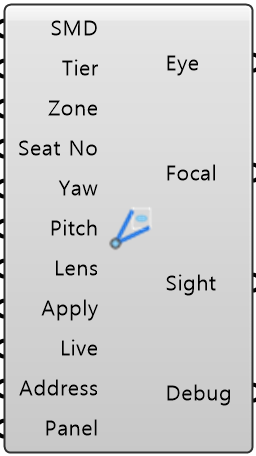
Seat Map Data SMDObject · itemThe seat map from Seat Map
Tier Integer · itemWhich tier the seat is on, 1 = lowest
Zone Integer · itemWhich zone of the tier, counted the way Seat Map numbers them
Seat Number Seat NoInteger · itemThe seat number inside the zone, as the map prints it
Yaw Number · itemLook left or right from the eye point, in degrees
Pitch Number · itemLook up or down from the eye point, in degrees
Lens Number · itemCamera lens, 35mm-film equivalent
Apply Boolean · itemWire a Button to move the perspective viewport to this seat
Live Boolean · itemOn = the viewport follows every change, so you can look around by sliding
Address Text · itemA seat address like T1 05 S 25
Panel Values PanelObject · itemEvery value from Input Panel, as one bundle
Eye Point EyePoint · itemWhere the camera stands
Focal Point FocalPoint · itemWhat the camera aims at, before Yaw and Pitch
Sight Line SightLine · itemThe eye-to-target line actually applied to the viewport
Debug Text · itemDeveloper diagnostic output for tracking down bugs
Colored ports carry the chain from one component to the next. The rest are values you set once.
Inputs
- Seat Map Data
SMDThe seat map from Seat Map - the one wire this component needs - Tier
TierWhich tier the seat is on, 1 = lowest - numbered the way Seat Map numbers them, so merged stands' tiers with the same tier label are one tier (default 1) - Zone
ZoneWhich zone of the tier, counted the way Seat Map numbers them (default 1) - Seat Number
Seat NoThe seat number inside the zone, as the map prints it (default 1) - Yaw
YawLook left or right from the eye point, in degrees. + = left (default 0) - Pitch
PitchLook up or down from the eye point, in degrees. + = up (default 0) - Lens
LensCamera lens, 35mm-film equivalent. 50 is a natural human view (default 50) - Apply
ApplyWire a Button to move the perspective viewport to this seat. One press, one jump Default false. - Live
LiveOn = the viewport follows every change, so you can look around by sliding (default false) - Address
AddressA seat address like T1 05 S 25. Wired, it wins over Tier, Zone and Seat Number - Panel Values
PanelEvery value from Input Panel, as one bundle. Anything you wire in yourself wins over it
Outputs
- Eye Point
EyeWhere the camera stands - the same point the C-value map measures from - Focal Point
FocalWhat the camera aims at, before Yaw and Pitch - the focal point the sections were drawn to. C-value Seat may grade against another point (its Focal Curve) - that is a point this view must show, not where it aims - Sight Line
SightThe eye-to-target line actually applied to the viewport - Debug
DebugDeveloper diagnostic output for tracking down bugs. Copy this when reporting a problem
- Component
- VIEWSEAT-001
- Ribbon
- Bowl Analysis
- Tier
- core
- Ports
- 11 in · 4 out
- Version
- 1.0.11
- Checked
- 2026-10-08