Antlion / Components / Section Variant
Section VariantSECTION-004
Keeps the main section and changes it inside a zone, tier by tier - leaves out rows at the front or the back, merges every two rows into one deep row, or both. The rows that stay do not move, so one chain builds the whole bowl and follows the main section. For changes in several zones, give each zone its own Section Variant on the same main sections, merge them, and wire the result into Combine Sections. For a stand with other risers, take a second Auto Section (with Main Section) through its own Section Plus, set ZONE_ONLY here, and join it with the main sections in Combine Sections.
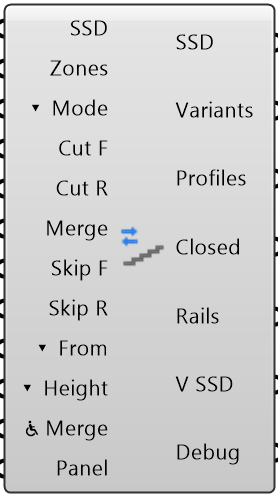
Ports with a dark edge and line carry the chain from one component to the next. The rest are values you set once. Inputs marked ▾ take a Value List: wire one in and it fills with the choices.
Inputs
- Stand Sections
SSDThe main sections. Wire from Section Plus. Every Section Variant takes the same main sections - Zones
ZonesWhere the changes apply - zones from Bowl Zone. Every zone takes the same changes, tier by tier, and the zone's own tiers choose which tiers it touches. For other changes in another zone, use a second Section Variant on the same main sections, merge the two, and wire them into Combine Sections - Variant Mode
▾ ModeOne value per tier. ROWS changes rows on that tier - it reads Cut Front Rows, Cut Rear Rows and Merge Rows, which can be used together. CUT_TIER leaves out every row of that tier. ZONE_ONLY changes no rows: these sections stand only in that zone on that tier, and Combine Sections puts them next to the sections of the rest of the bowl. STANDING keeps the rows as they are and reads that tier as a standing area inside the zone - eyes at standing height, C-values over the second row in front; Cut Front Rows and Cut Rear Rows still apply. With fewer values than tiers, the last one is reused (default ROWS) - Cut Front Rows
Cut FOne value per tier, used with ROWS and STANDING - how many rows to leave out at the bottom of the tier. The rows themselves are not built; to keep the rows and leave only their seats out, use Clear Front Rows on Bowl Zone. 0 leaves none out; the tier's row count or more leaves out the whole tier (default 0) - Cut Rear Rows
Cut ROne value per tier, used with ROWS and STANDING - how many rows to leave out at the top of the tier. The rows themselves are not built; to keep the rows and leave only their seats out, use Clear Rear Rows on Bowl Zone. 0 leaves none out (default 0) - Merge Rows
MergeOne value per tier, used with ROWS - true merges every two rows that are still there into one deep row, after Cut Front Rows and Cut Rear Rows. The Skip and Merge inputs below set which rows and how (default false) - Skip Front Rows
Skip FOne value per tier, used when Merge Rows is true - rows that stay as they are at the bottom, counted from the first row still there (default 0) - Skip Rear Rows
Skip ROne value per tier, used when Merge Rows is true - rows that stay as they are at the top, counted from the last row still there (default 0) - Merge From
▾ FromOne value per tier, used when Merge Rows is true - which end the pairs are counted from. With an odd number of rows, one row stays unmerged at the other end: FRONT leaves the last row, REAR the first (default FRONT) - Merge Height
▾ HeightOne value per tier, used when Merge Rows is true - the floor of each merged row. SECOND raises it to the height of the second row: the eyes that stay do not move. FIRST lowers it to the height of the first row: the eyes come down with it (default SECOND) - Merge Wheelchair Rows
♿ MergeOne value per tier, used when Merge Rows is true - true pairs up the wheelchair rows too. Where the wheelchair platform already stands it stays as it is and the wheelchair spaces are not touched; where those rows carry ordinary seats they merge like any other pair. false leaves every pair with a wheelchair row unmerged (default true) - Panel Values
PanelEvery value from Input Panel, as one bundle. Anything you wire in yourself wins over it
Outputs
- Stand Sections
SSDThe same sections, carrying the variants. Wire into Stand 2D - Seat or Custom Seat applies them. With more than one set of sections, wire every set into Combine Sections first - Variants
VariantsA line per zone and tier - what is left out and merged there - Variant Profiles
ProfilesThe stepped line along the tread tops of each zone and tier after its changes, drawn where the main section is - one per line of Variants, in the same order. Compare it with Section Profiles. A whole tier left out gives an empty item - Variant Closed Profiles
ClosedThe closed section after each variant, drawn where the main section is - one per line of Variants, in the same order. Compare it with Closed Profiles of Section Plus. A whole tier left out gives an empty item - Variant Rail Sections
RailsThe front barrier after each variant, one closed section curve per line of Variants - at the front of the first row that stays, with the main barrier's size. The new rear barrier behind rows left out at the top is set on Rail 3D and is not drawn here - Variant Sections
V SSDThe sections as they are inside each zone, for Section Analysis only - one branch per zone, each with every tier of the bowl. Rows left out are gone and merged rows are one deep row, so the C-values are those of the zone. Do not wire into Stand 2D, Vomitory or Seat - they take Stand Sections - Debug
DebugDeveloper diagnostic output for tracking down bugs. Copy this when reporting a problem
- Component
- SECTION-004
- Ribbon
- Bowl ▸ Section 2
- Tier
- core
- Ports
- 12 in · 7 out
- Version
- 1.2.1
- Checked
- 2026-11-20