Antlion / Components / Custom Startline
Custom StartlineSTARTLINE-004
Start line taken from a curve you draw - aligned to the field frame for a preset field, used as drawn for a custom field. Use when no preset shape fits. An open curve gives a stand with two free ends.
1Plan & setup
2Section
32D layout
43D solids
5Analysis
Fig. 1 — PortsReads left, writes right
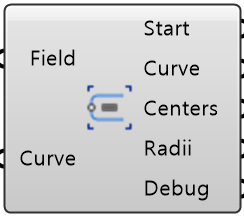
Field Info FieldObject · itemThe field, straight from Field
Custom Curve CurveCurve · itemYour start-line curve in plan
Start Line StartObject · itemThe start line as one object
Start Line Curve CurveCurve · itemYour curve
Arc Centers CentersPoint · listCenter point of every arc found in your curve
Arc Radii RadiiNumber · listRadius of each detected arc, matching Arc Centers
Debug Text · itemDeveloper diagnostic output for tracking down bugs
Colored ports carry the chain from one component to the next. The rest are values you set once.
Inputs
- Field Info
FieldThe field, straight from Field. Preset field: your curve is aligned to its frame. Custom field: used as drawn - Custom Curve
CurveYour start-line curve in plan. Closed = a full ring, open = two free ends
Outputs
- Start Line
StartThe start line as one object - curve plus any arcs found in it. Wire into Axis - Start Line Curve
CurveYour curve - aligned to the field frame (preset field) or exactly as drawn (custom field) - Arc Centers
CentersCenter point of every arc found in your curve (empty when it has none) - Arc Radii
RadiiRadius of each detected arc, matching Arc Centers - Debug
DebugDeveloper diagnostic output for tracking down bugs. Copy this when reporting a problem
- Component
- STARTLINE-004
- Ribbon
- Bowl ▸ Section 1
- Tier
- core
- Ports
- 2 in · 5 out
- Version
- 1.0.11
- Checked
- 2026-10-07