Antlion / Components / Custom Axis
Custom AxisAXIS-003
Section placement planes from axis curves you draw yourself. Each curve's crossing with the start line becomes an axis, numbered along the start line - those numbers are what Cut refers to.
1Plan & setup
2Section
32D layout
43D solids
5Analysis
Fig. 1 — PortsReads left, writes right
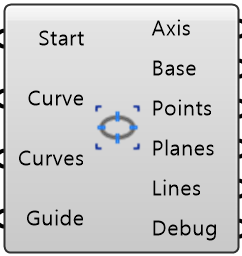
Start Line StartObject · itemThe start line from any Startline component
Start Line Curve CurveCurve · itemCross your curves with this instead
Axis Curves CurvesCurve · listYour axis curves, each crossing the start line
Guide Length GuideNumber · itemLength of the preview line drawn at each axis
Axis Object · itemThe axis system as one object
Base Line BaseCurve · itemThe faceted line the stand is built on
Axis Points PointsPoint · listOne point per axis, numbered along the start line
Axis Planes PlanesPlane · listOne plane per axis
Axis Lines LinesCurve · listPreview line at each axis, for checking direction and spacing
Debug Text · itemDeveloper diagnostic output for tracking down bugs
Colored ports carry the chain from one component to the next. The rest are values you set once.
Inputs
- Start Line
StartThe start line from any Startline component - the normal way to feed this - Start Line Curve
CurveCross your curves with this instead. Used only when Start Line is not wired - Axis Curves
CurvesYour axis curves, each crossing the start line (a short curve pointing at it works too) - two or more, three on a closed start line. Axes are numbered along the start line, not by list order - Guide Length
GuideLength of the preview line drawn at each axis. Display only (default 5000 mm)
Outputs
- Axis
AxisThe axis system as one object. It also sets the axis numbers Cut refers to - Base Line
BaseThe faceted line the stand is built on. Its outward normal sets which way it faces - Axis Points
PointsOne point per axis, numbered along the start line - Axis Planes
PlanesOne plane per axis - facing follows your curve, away from the field - Axis Lines
LinesPreview line at each axis, for checking direction and spacing - Debug
DebugDeveloper diagnostic output for tracking down bugs. Copy this when reporting a problem
- Component
- AXIS-003
- Ribbon
- Bowl ▸ Section 1
- Tier
- core
- Ports
- 4 in · 6 out
- Version
- 1.0.11
- Checked
- 2026-10-07